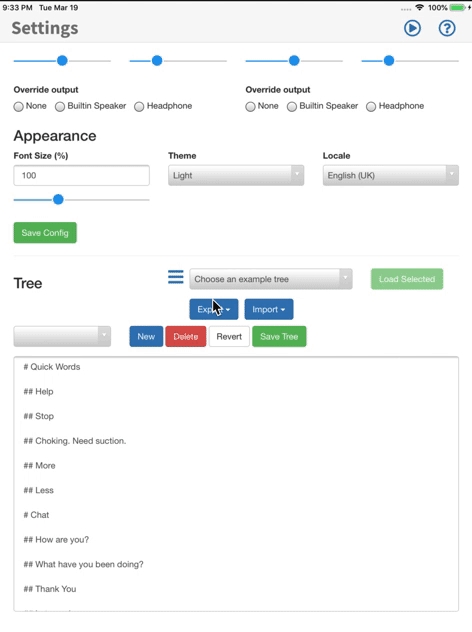
There are three formats that pasco reads langauge trees in.
Mindnode - Markdown format. - ATX Style
Files look a little like this:
# Chat


## How are you?

- Ace!

- Whats that?

-

## Whats happening?

- Yeah for sure

## I’m fed up


# I need something


## Its in my bag

## Its somewhere else

## Its upstairs
It's not the easiest to read - note that with markdown line breaks are key. It's easiest to generate this with something like MindNode - an iOS and Mac app to generate MindMaps. It really is a breeze
Tab OR Space Indented text file
Here a file looks like this:
Chat
	How are you?
	Ace!
	Whats that?
	Whats happening?
		Yeah for sure
	I’m fed up

I need something
	Its in my bag
	Its somewhere else
	Its upstairs
It looks a little easier to read - but be warned - spaces and tabs at the beginning cannot be mixed. Don't put a space and then a tab. Its not the easiest.
Open Board format
Pasco natively supports the open board format. To use this simply upload your board(s) as a 'obz' file in the Configuration screen - and hopefully it should work! Note that we of course strip images - and right now there is no built in 'cue' for items. We use the label for this.
To export - select Export in the Configuration screen and select 'obz' format. You will need a way of sharing this file - either via email or your files app (and then dropbox etc) to make use of this outside of your iPad. Note it exports all your sound files too.
pasco is a cordova app. The logic is largely in javascript with some custom work built for iOS.
To get you up and running this should get you to the point where you can work on the normal web version:
git clone https://github.com/AceCentre/pasco.git
npm install
bower install
npm run dev
For the iOS version you will need to be on a mac with XCode. Here are the commands to get going with this:
npm run cordova-dist
cd cordova
cordova platform add ios
cordova run
You should find the xcode project in cordova\platforms\ios\pasco.xcodeproj
npm install --upgrade cordova@latest
npm install --upgrade cordova-ios@latest
npm install --upgrade ios-deploy
npm install cordova-icon i.e. what goes where.
With meta tags you can specify attributes for any node in the tree file. For example. You can implement back function in a branch, When you select back node then it will move up from Its current position in the hierarchy. In the example below when "Go Back" has selected it will move to "Animals".
Animals
	Dog
	Cat
	Bird
	Go Back <meta data-back-n-branch="1">
Meta tag is a regular html tag, And here is how we add attributes to a node. <meta data-name="value" [...]>. All attributes should start with prefix data-, Following with attribute name. Note that tag can contain more than one attribute.
In example above back-n-branch specifies a behaviour for when It's selected.
auditory-cuetype: string
Auditory cue specifies what should get uttered when user scrolls over nodes, AKA move to next or previous.
auditory-maintype: string
Auditory main specifies what should get uttered when user selects a node.
It's not applicable to spelling branch
back-n-branchtype: integer (greater than zero)
To move up n levels in the tree hierarchy when the node has select.
back-n-branch-notifytype: boolean
Back n branch attribute performs back functionality. And it does not utter (with main voice) the node itself. As selecting a node does that. When you include back-n-branch-notify it notifies the user by uttering with main voice.
audiotype: path
The audio to play instead of utterance with speech synthesizer. It applies to cue and main voice.
cue-audiotype: path
The audio to play when user scrolls through nodes. cue-audio overrides audio attribute when you specify both.
main-audiotype: path
The audio to play when user selects a node. main-audio overrides audio attribute when you specify both.
localetype: string
Specify locale for a node. At the moment this attribute has only effect on speech synthesizer voice selection. At config you can specify what voice to use for every locale, When you apply locale to a node it will change the voice accordingly.
Here are possible values you can set as locale.
"en-GB" English (UK)
"de" German
"fr-FR" French
"es-ES" Spanish
"ar" Arabic
"gu" Gujarati
"cy" Welsh
You may also use only language part of locale. For example instead of "en-GB" if you use en. pasco will match it to first locale it finds with same language.
cue-localetype: string
Same as locale, This attribute is designed to override locale for cue voice. cue-locale precedes locale when both are set in a node.
main-localetype: string
Same as locale, This attribute is designed to override locale for main voice. main-locale precedes locale when both are set in a node.
spell-branchtype: boolean
pasco enables spelling with this attribute. You have to assign it to top level node that contains spelling branch. Here's an examples.
I have something to say
I'll spell it<meta data-spell-branch>
  A
  B
  Finish<meta data-spell-finish>
You may also set the attribute to root node like this.
<meta data-spell-branch>
A
B
Finish<meta data-spell-finish>spell-delchartype: boolean
When user selects a node with this attribute. It removes a letter from existing spelling session.
spell-finishtype: boolean
You have to use "spell-finish" to finish the existig session. It also notifies with main voice similar to selecting a node outside spell-branch.
spell-lettertype: string
You may use spell-letter to specify next letter to add in the spelling session. By default it is going to use the text of the node itself.
spell-wordtype: string
You can use spell-word to complete a word in the spelling memory. Let's say you select letter A and then select spell-word="apple". Then it will remove registered letter A and then adds apple.
Spelling process allows the user to add more than one word by adding space in between them.
spell-update-dyn-onchangetype: boolean
When this attribute is given to spell-branch node. It will update all dyn nodes inside this branch.
This attribute is primarily used when spell-branch node contains dynamic nodes. With dyn="spell-word-prediction" and/or dyn="spell-letter-prediction".
stay-in-branchtype: boolean
With stay in branch you can specify a branch to start over from when user selects a leaf node in that branch. Here's an example.
I have something to say
I'll spell it<meta data-spell-branch data-stay-in-branch>
  A
Finish<meta data-spell-finish>change-treetype: path
When user selects change-tree pasco tries to load the given tree and open it. Then it starts from beginning in the new tree.
change-tree-by-nametype: string
Change by tree is similar to changetree. Except it loads the tree from saved trees inside pasco. You can manage saved trees at Vocabulary section of config page.
no-maintype: boolean
When you select a node that has no-main it will not utter main voice.
webhooktype: url (string)
pasco has a set of webhook attributes that enables users to perform an http request to sites that support cross-origin xhr requests. It is specifically designed for use of iot webhooks like zapier.com, Here's an example.
Add a record <meta data-webhook="https://hooks.zapier.com/hooks/catch/.../" data-webhook-method="POST" data-webhook-content-type="application/json" data-webhook-body='{"Name":"random row"}' data-webhook-success-message="Did add a record"/>webhook-methodtype: string
Specifies method of the webhook request. Default value is POST. Possible values are: GET/PUT/POST/DELETE, etc.
webhook-content-typetype: string
Specifies request content type of the webhook request. Default value is application/json.
webhook-bodytype: string
Specifies request body of the webhook request. Default value is {} (Empty json object) when content-type is application/json. Otherwise body is empty.
webhook-success-messagetype: string
You can set the message to utter when pasco receives success response from this webhook request. You can add this attribute to a webhook node.
webhook-skip-validating-responsetype: boolean
With this attribute added to webhook. It will skip validating response when response is OK (200). This attribute was specifically designed for zapier.com webhook. By default it is false.
webhook-modify-headerstype: boolean
When this attribute is true, Only then webhook will actually modify request headers. Default is false, It is designed for when cross-origin server does not allow for modifying headers. At the time of design zapier.com webhook does not allow changes on headers.
dyntype: string
Dynamic attribute introduces dynamic nodes into pasco. Below you can see possible values.
dyn="trees-switcher"Lists saved trees, Each as a node. And when user selects any. It will change the tree to that.
dyn="spell-word-prediction"Offers some words as prediction of current spelling. Here are the accepted attributes for this dyn. word-file, max-nodes and predict-after-n-chars.
dyn="spell-letter-prediction"Predicts order of alphabetic letters according to current spelling status. Here are the accepted attributes for this dyn. word-file, max-nodes, predict-after-n-chars and alphabet.
words-filetype: path
Words file used for word prediction. At the moment predictions have a simple method of sorting according to weight in words file. Example words file
This attribute is required when spell dyn has set to a node.
Only for spell dyns
max-nodestype: integer (greater than or equal zero)
Maximum number of nodes to show as predictions. Default: 3
Only for spell dyns
predict-after-n-charstype: integer (greater than or equal zero)
Start predicting after n letters has inserted when spelling. Default: null (no limit)
Only for spell dyns
alphabettype: string
String of letters to use for prediction. Default: abcdefghijklmnopqrstuvwxyz
Only for spell predict letters dyn
Path is of type string that is expected to be http(s) url or relative path in the package or relative path from base url.
No value is required, Since it is a boolean attribute, example <meta data-attr-name>. You can also set Its value to false or true.
'Meta-data' commands are commands added in-line to the tree file which changes the function of that part of the language. For example, we have commands that stop the tree automatically going back to the top - and commands that help with spelling. For example, If you want to change create a command to go back you would type this in your file
	Dog
	Cat
	Bird
	Go Back <meta data-back-n-branch="1">
This is the Control data command - back-n-branch. This means you can set an action on the press of this command to go back up n levels. Maybe one or two branches if necessary.
The following is an example markdown for a metadata in a node
I have something to say<meta data-audio="some/audio/file.mp3" auditory-cue="<TEXT>">It's the replacement text for utterance for cue
To stay in a branch simply add this at the top level item:
<meta data-stay-in-branch>e.g.
I would like<meta data-stay-in-branch>
	Pizza
	with Cheese
	with Pepperoni
To go back one level or several you can use use back-n-branch=N where N = number of branches to step back to. e.g.
<meta data-back-n-branch="1" data-back-n-branch-notify>And lastly, to select an item and then exit use select-utterance
<meta data-select-utterance>Spelling is possible. To start it you need a branch that defines a alphabet. So the root node should have spell-branch:
I'll spell it <meta data-spell-branch>To spell a letter use spell-letter e.g. <meta data-spell-letter=" ">
spell-letter="<A LETTER>"It's the replacement for the text existed in that node. Instead this value will be added to list of letters
spell-finishThe option to delete the last letter selected
spell-delcharThe option to remove last inserted character in spelling queue
spell-branchConsiders all leaf of that branch to be as spell letters, It used for defining where spell function should be used.
Firstly we need to tell pasco that there will be changes to the layout after each selection:
<meta data-spell-branch data-spell-update-dyn-onchange>Next we need to define some aspects of prediction. For Word prediction we define it with data-dyn=spell-word-prediction:
<meta data-dyn="spell-word-prediction" data-words-file="trees/Spell_Prediction/bncfrequency.json" data-max-nodes="3" data-spell-finish data-predict-after-n-chars="3"We need to define a corpus to predict from. There are a range of Corpus' already in pasco (see here for some examples. These are effectively a list of words with their frequency.)
data-words-file="trees/Spell_Prediction/bncfrequency.json" Next we say the number of predictions that are going to be presented:
data-max-nodes="3" And lastly, we can define after how many letters are spelt before we get predictions:
predict-after-n-chars="number"We can also use next letter prediction. This is done with data-dyn=spell-letter-prediction:
<meta data-dyn="spell-letter-prediction" data-words-file="trees/Spell_Prediction/bncfrequency.json">(A full example can be seen here)
audio="<PATH/TO/AUDIO/FILE>"Plays the selected audio for cue and main voice
cue-audio="<PATH/TO/AUDIO/FILE>"Plays the selected audio for cue voice
main-audio="<PATH/TO/AUDIO/FILE>"Plays the selected audio for main voice